
CORS in digital signage: why it breaks on the TV and never in the native app
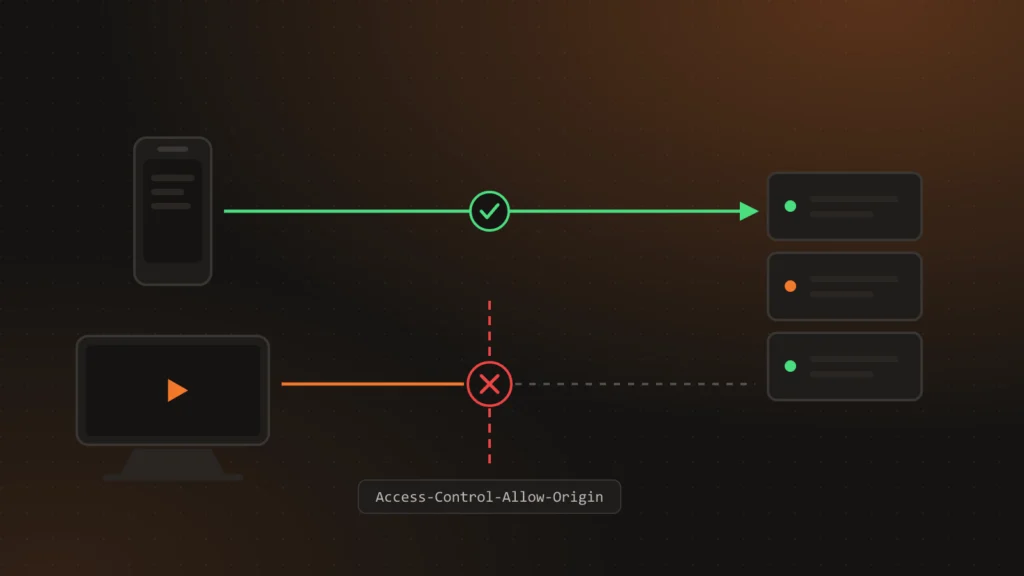
The same ChronoFlow API serves a Flutter app on phones, tablets and Android TV, the web dashboard, and the apps for Samsung and LG TVs. Almost everything works the same for all of them, with one exception: CORS. On the phone it never causes trouble; on the TV, one new header is enough to stop the Player without a single error in the API. This article explains why that happens and the rules we follow.
Who sends an Origin and who does not
CORS is a browser rule, not an HTTP one. When JavaScript on a page tries to call another origin, the browser first asks the server whether that is allowed, and if the answer does not satisfy it, it blocks the call. The server never even learns the real request existed.
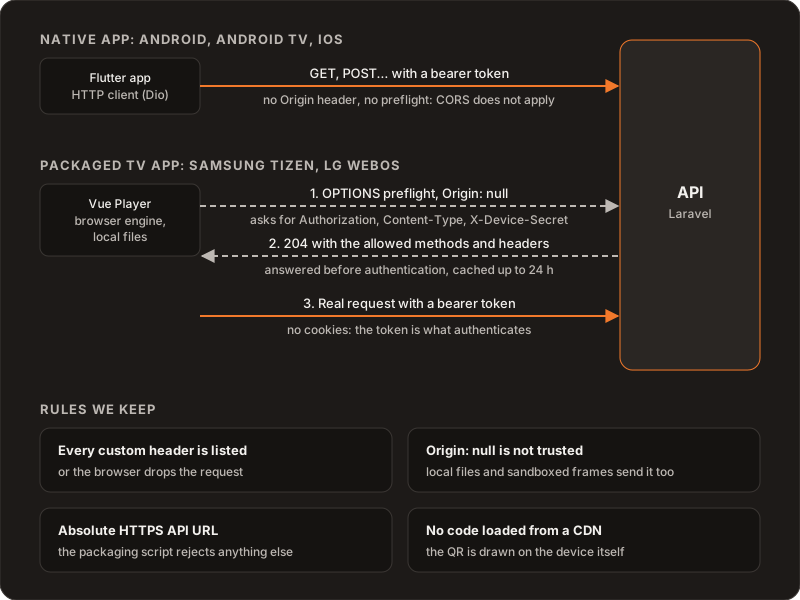
- The Flutter app talks to the API through a native HTTP client (Dio). There is no browser, no
Originheader and no preflight request. CORS does not apply. We have no web build of the Flutter app either, so that will not change. - The web dashboard is served from the same domain as the API. For the browser it is the same origin, so there is no CORS there either.
- The Samsung (Tizen) and LG (webOS) apps are the Vue web Player, packaged. They run in the TV’s browser engine and load from local files in the package, not from a domain. For them, every API call is cross-origin, and CORS applies in full.
Origin: null
A packaged TV app has no domain of its own, so the engine sends Origin: null. The temptation is to add null to the allowed origins and move on. We do not: files opened from disk, sandboxed iframes and some redirects also send null, so allowing null means allowing any of them.
What matters is that CORS is not an authentication mechanism. It decides which pages can read a response from a browser, not who can talk to the API. In ChronoFlow what authenticates is a bearer token in the Authorization header. We use no cookies, so a foreign page has no session to ride on even if it manages to send a request.
The preflight, before authentication
Almost every Player call needs an OPTIONS preflight: it carries Authorization, sends JSON and, when pairing, a custom header with the device secret. The browser asks whether those methods and headers are allowed and only then sends the real request.
That preflight never carries the token, so it has to be answered before any authentication check. In Laravel the global CORS middleware does it, replying with a 204 and the allowed methods and headers. The answer can be cached for up to 24 hours, although each engine applies its own, lower, maximum, so it is not something to rely on.
Every new header goes on the list
This is the easiest trap to fall into. When we hardened pairing, the Player started sending its secret in a new header, X-Device-Secret. If that header is not on the allowed list in the CORS configuration, the TV browser cancels the request after the preflight. The API logs no error because the real request never arrives, and the native app works fine, which is even more misleading. That is why the same change that introduced the header added it to the list, and it is a project rule: a new custom header is not done until it is in the CORS configuration.
The same applies the other way round. JavaScript can only read a handful of response headers; the rest have to be exposed explicitly. The API exposes X-API-Version so the Player can tell which version it is talking to.
Buckets have CORS too
Files are not served by the API but from object storage, through signed URLs (see object storage by plan). The buckets have their own CORS rules, versioned in the repository next to the scripts that apply them. Uploads are limited to each environment’s dashboard origin. Reads are open to any origin, because the TV Players need to download files for their offline cache and have no stable origin. The buckets stay private: without a signed URL nothing can be read.
One codebase, three targets
The dashboard and the TV Player come from the same Vue code, built with Vite in three modes: web, Tizen and webOS. The TV modes use relative paths and a hash router, because in a package there is no server to resolve URLs. The packaging script refuses to build the package if the API URL is not absolute HTTPS, if any asset uses a root-absolute path, or if an environment file or a key slipped in.
Some things the web derives from the page have to be fixed at build time. The realtime WebSocket host is one: in the browser it can be derived from the domain, but a package has no domain, so the release pipeline injects it into every TV build.
Nothing that depends on third parties
Every remote resource is one more point of failure on a TV that may sit behind a restrictive network, and one more conversation with CORS. That is why none of the TV Player code is loaded from a CDN: it all ships inside the package. For example, the pairing QR is drawn on the device itself (see pairing screens with a code and a QR).
The TV engine is not your browser
Testing on a Samsung Odyssey G6 monitor running Tizen 6.5 taught us that a TV’s web engine lags behind a desktop browser and has ideas of its own. D-pad focus was invisible with styles that worked in Chrome, so remote-control focus now has its own module with tests. The Player did not fill the screen until the layout was fitted to the TV window. None of that shows up in a desktop browser: you have to test on the device.
What we ruled out
- Allowing
Origin: null. It opens the door to any local or sandboxed page. - Cookie sessions on the TV. They add CSRF and third-party cookie rules to an environment that is already hard, with no gain over a token.
- Loading libraries from a CDN. An outside failure would leave the screens black.
Further reading
Why there is one Player in Vue and another in Flutter: Controller and Player in one app. How clients authenticate: OAuth2 with Passport for web, mobile and TV. The product: ChronoFlow. If your product also has to run on TVs: Services.