
OAuth2 with Passport for web, mobile and TV: one identity, no secret in the client
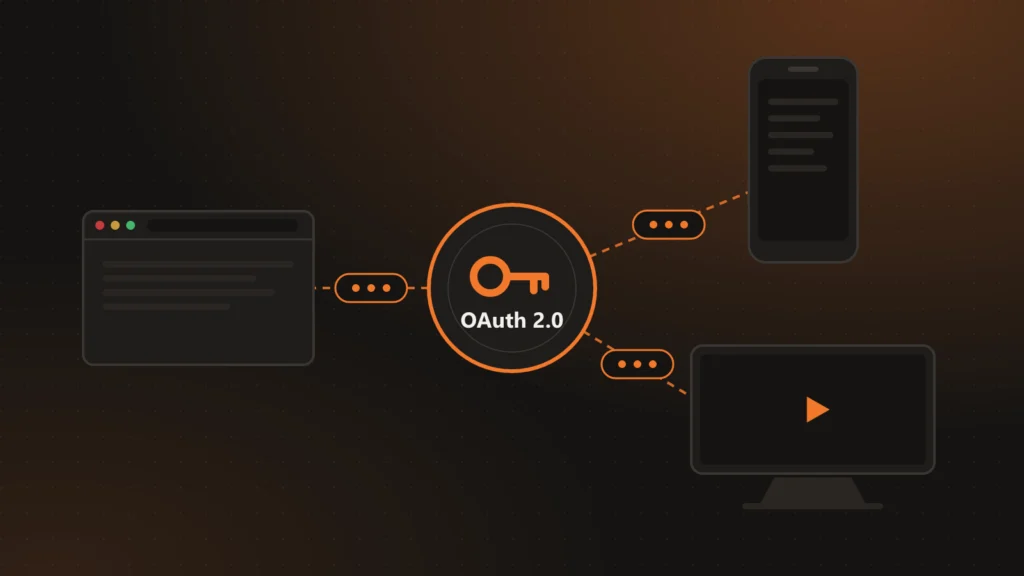
The same person uses ChronoFlow from the web dashboard on a laptop, from the app on a phone and, sometimes, from a TV. It is one account, but very different clients: a browser, a native app that can be decompiled, and a TV package installed on devices we do not control. This article explains how we serve them all with a single OAuth2 server, and why none of them carries a secret.
Why Passport
The API is Laravel, which ships with Sanctum: simple tokens, aimed mostly at a single-page app on the same domain. There was going to be a mobile app and TVs from the start, so in one of the project’s first issues we replaced it with Passport, Laravel’s official OAuth2 server. It gives us the password grant for user sessions, refresh tokens, distinct clients, and personal access tokens for cases that are not a sign-in.
One client per channel, with the secret on the server
In OAuth2, a confidential client identifies itself with an id and a secret. The trouble is that a secret inside a mobile app or a TV package stops being secret: unpacking it is enough to read it. So none of our clients carries one.
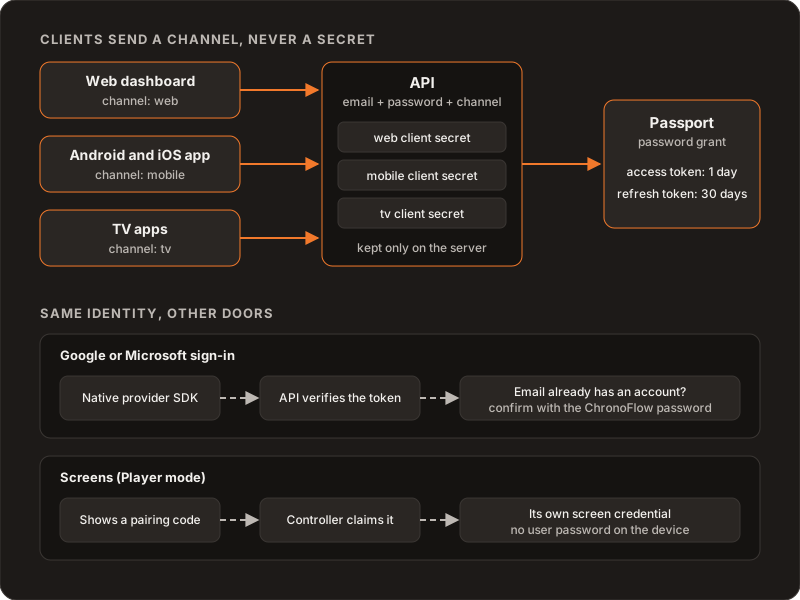
We have three password-grant clients, one per channel: web for the dashboard, mobile for the app on Android and iOS phones and tablets, and tv for Android TV and the Samsung and LG apps. The apps send the API an email, a password and their channel name, nothing else. The API picks the matching client, adds its secret and asks Passport for the token internally. The secret never leaves the server.
Splitting by channel is not just tidiness. It lets us rotate one channel’s secret without touching the others, and every token stays tied to the client that issued it, so you can tell what kind of device each session comes from.
How long a session lasts
For user sessions, the access token lasts one day and the refresh token 30 days. The first design used a one-hour access token, and we later extended it to a day. It is a balance: a short token means refreshing all the time, and a long one extends how long a stolen token stays useful. The 30-day refresh sets when you have to type the password again if the app has not been used.
Signing out revokes only the current session. If someone signs out on the laptop, their phone stays signed in and the screens keep playing.
What is switched off
Passport ships with an authorization page for the code flow, meant for third parties requesting access to an account. ChronoFlow has no third-party integrations, so that page is disabled: the API is API only and serves no pages. Everything we do not use is off; every route left on is one more thing to maintain and watch.
Google and Microsoft, without blindly merging accounts
Social sign-in uses each provider’s native SDK on the device. The app gets a token from the provider and sends it to the API, which validates it with Google or Microsoft and retrieves the identity. If it is new, the account is created; if it is already linked, the user is signed in.
The delicate case is when the provider’s email already exists in ChronoFlow as a password account. We do not merge them automatically: the API answers with a conflict and the app asks for the ChronoFlow password to confirm the same person controls both. Several failed attempts lock that confirmation for a while. Linking by email without asking is convenient, but it turns any slip at the provider into access to the account.
Screens do not sign in
A screen never sees anyone’s password. It joins the account with a short code that someone claims from the Controller and receives its own credential; see pairing screens with a code and a QR.
Refreshing without races in the app
In the Flutter app, tokens live in the system’s secure storage (Keychain on iOS, Keystore on Android), never in preferences. An HTTP client interceptor catches the 401, refreshes and retries the request once. If several requests fail at the same time, they share a single refresh instead of firing five, because with single-use refresh tokens the second refresh would invalidate the first.
Guard rails around it
Sign-ins are rate-limited per IP and email and also per account, so spreading attempts across many IP addresses does not help. Registration and the other authentication routes have their own limits. And the internal operations console does not use Passport: its credentials are separate, so a customer account can never turn into an admin one.
What we ruled out
- One client for everything. Simpler, but there is no way to rotate a secret without ending every session, or to tell what kind of device each one comes from.
- Putting the secret in the apps. Anyone with the package can read it. A secret in the client protects nothing.
- Home-made tokens. Signing and validating our own tokens is easy to start and hard to get right. Passport already handles expiry, revocation and refresh.
- Merging accounts by email automatically. Convenient for whoever signs up, dangerous for whoever already had an account.
What we would do differently
The password grant works and we keep it contained, but current OAuth guidance advises against it for new clients in favor of the authorization code flow with PKCE. If we started today, we would evaluate that from day one for web and mobile, even if it means sign-in pages hosted by the API.
Further reading
How one app acts as Controller and Player: Controller and Player in one app. How a screen joins: pairing screens with a code and a QR. The product: ChronoFlow. If you are designing authentication for your own product: Services.