
Object storage by plan: moving files between R2 and B2 without stopping the screens
Images and videos in ChronoFlow do not live on the API server but in S3-compatible object storage. The twist is that they do not all live in the same place: free-plan accounts use Cloudflare R2 and Pro accounts use Backblaze B2. This article explains how the API decides where each file goes, how files move when someone changes plan, and why the screens never notice. Why we picked two providers, and what each one costs, is a story for another article.
One disk per plan, and each file remembers its own
In Laravel, each provider is a configured “disk”. A single function maps the account’s plan to its disk: Free goes to R2; Pro and the pilot plan go to B2. No other place in the code decides it.
The other half of the idea is that each row in the files table stores the disk that file lives on. Reads follow the row, not the current plan. It looks like a detail, but it is what makes changing plan safe: during a move, a file still on R2 keeps being read from R2 even though the account is already Pro.
If a disk is not configured, the API fails with a clear error. There is no silent fallback disk: we would rather see an error at deploy time than find out months later that a paying account’s files are with the wrong provider.
Uploading straight to the bucket
Files do not go through the API. The client asks for an upload, the API checks it fits the quota and returns a short-lived signed URL, and the client uploads the file directly to the plan’s bucket. When it finishes, it tells the API, which checks the object exists and its size matches what was announced before registering it. From there, a background job generates the thumbnail and reads the duration of videos.
For playback, the API hands out signed read URLs that expire in one hour. Thumbnails are not in the bucket but in the database, served through their own signed route: they are small, requested constantly in lists, and this way they depend on no provider.
Quotas checked twice
The free plan has 250 MB in total, with at most 10 MB per image and 80 MB per video. Pro has 15 GB, with 20 MB per image and 250 MB per video. The quota is checked when the upload is requested and again when it completes, because other uploads may have finished in between.
Each account’s usage is kept in a counter incremented atomically in the database, without recomputing sums on every request. A monthly job reconciles it with the real files in case anything drifted. The account gets notices at 80, 90 and 100% of its space.
Upgrading: the move
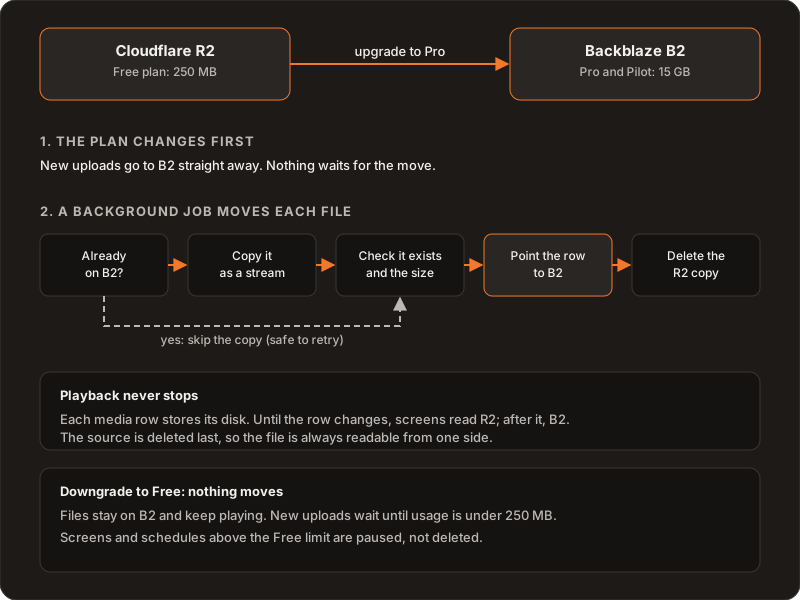
When an account moves to Pro, the first thing that changes is the plan. From that moment, new uploads go to B2 and the limits are Pro’s; nobody waits for anything. Then a job is queued that moves the existing files, one by one:
- If the file already exists on B2, for example because an earlier attempt was cut short, the copy is skipped.
- Otherwise it is copied as a stream, without loading it all into memory.
- The job checks that the object exists on B2 and its size matches.
- The row is updated to point to B2.
- Only then is the R2 copy deleted.
Each move has an identifier and its job is unique, so queuing it twice does not run it twice in parallel. It retries up to three times with growing waits. Since every step can be repeated without side effects, a retry picks up where it left off.
Why the screens never notice
While the row points to R2, screens get R2 URLs; as soon as it points to B2, they get B2 URLs. Because the source is deleted after the row is updated, there is no moment when the row points somewhere the file is not. A screen playing during the move notices nothing.
Downgrading: nothing moves
Back on Free, the files stay on B2 and keep playing. There is no move back. What changes are the limits: while the account uses more than 250 MB, it cannot upload new files. Screens and schedules beyond what the free plan allows are paused, not deleted, so going back to Pro leaves everything as it was.
We made that choice knowingly: keeping a free account’s files on B2 has a cost, but deleting or moving someone’s content because they changed plan is much worse.
What we ruled out
- Always reading from the current plan’s disk. Any file not yet moved would disappear the moment the plan changes.
- Moving before activating the plan. Someone who just paid would have to wait for a copy to finish before uploading anything.
- Deleting first and copying after. A failure halfway would lose files. Copy, verify and delete last loses none.
- A fallback disk. It hides configuration mistakes until it is too late.
What we would do differently
Today the move shows up in the server logs, not in the product. If we built it again, we would show its progress in the dashboard from the start: how many files are left and whether any could not be moved. That information reassures someone who just paid, and right now only we have it.
Further reading
How the content in those buckets is organized: playlists, schedules and groups. Why buckets need CORS too: CORS on smart TVs. The product: ChronoFlow. If you are designing storage for your own product: Services.