
Pairing screens with a short code and a QR, without typing a password on the TV
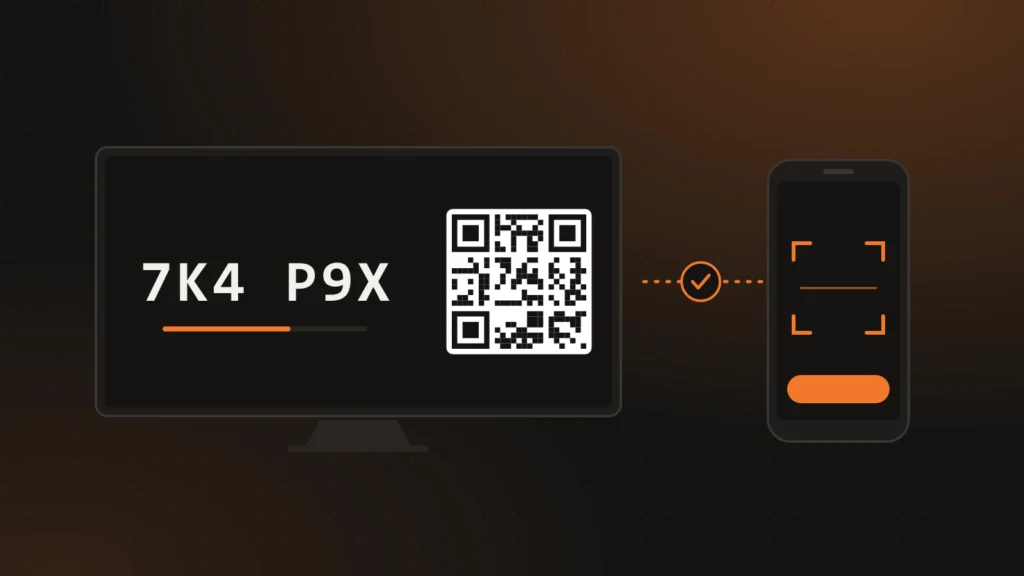
A signage screen usually lives in a lobby, behind a counter or above a checkout, and it is almost always driven with a remote control. Asking the installer to type the account email and password there is slow, awkward, and leaves the organization’s most valuable credential on a shared device. In ChronoFlow a screen joins an account another way: it shows a short code and a QR, and someone already signed in to the Controller claims it.
This article explains how that pairing works under the hood: what the server generates, what it checks before accepting a screen, and why the Player receives its credential exactly once.
Three actors, three steps
The same Flutter client runs as a Player (the screen that plays content) or as a Controller (the app or web dashboard used to manage it); see Controller and Player in one app. Pairing involves both, plus the API:
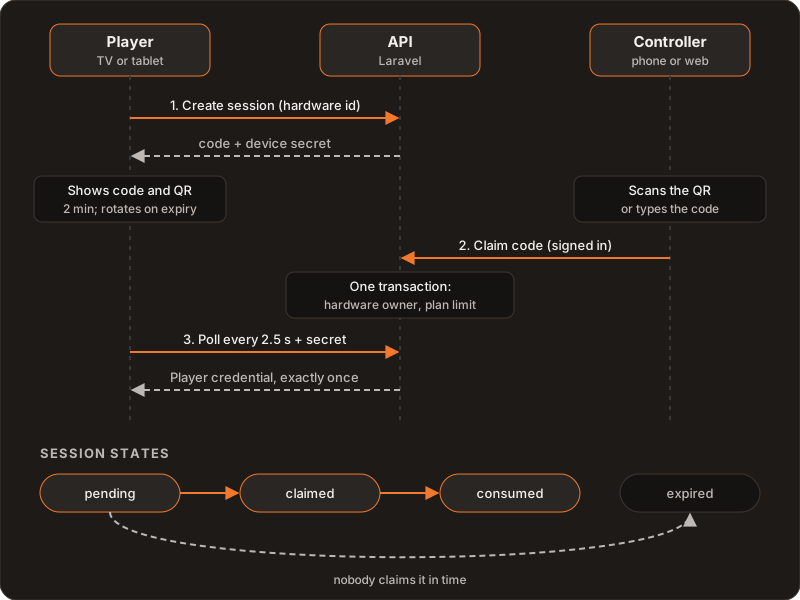
- The Player opens a session. It sends its hardware identifier, a tentative name, and its platform. The API answers with a pairing code and a device secret.
- The Controller claims the code. The signed-in user scans the QR or types the code, picks a name for the screen and, optionally, a group.
- The Player collects its credential. While it waits, it polls the session every 2.5 seconds with its secret. As soon as the session is claimed, it receives the credential it will use as a screen and starts playing.
A code you can read from across the room
The code has six characters, shown as two groups of three, like 7K4 P9X. The alphabet has 32 symbols: uppercase letters and digits without 0, O, 1 or I, which are easy to mix up on a TV three meters away. That gives just over a billion combinations, enough for a code that lives two minutes and whose lookups are rate-limited per IP address and per code.
Two minutes is not much time to type calmly, so nobody has to ask for a new code: if it expires while the screen is still waiting, the API rotates it on the next poll and hands out a new one with the same device secret. Only the text and the QR change on screen. We started with five minutes. With automatic rotation, shortening it cost the installer nothing and reduced how long a visible code is worth anything.
The code is not enough: the device secret
The code is visible to anyone who walks past the screen, so it cannot be the only thing standing between a passer-by and the Player credential. When it creates the session, the API also generates a random 48-character secret that travels only in that response. The server keeps just its SHA-256 hash, and the Player presents the secret on every poll.
A lookup without the right secret gets the same answer as a code that does not exist or has expired: it does not confirm that the code exists or is pending. The comparison runs in constant time, so nothing can be inferred from how long the answer takes either.
Claiming: one transaction, several checks
The Controller claims the code with its signed-in session, and everything happens inside one database transaction:
- One screen, one owner. If that hardware is already registered to another account, the claim fails with a conflict. If it is already in yours, for example after reinstalling the app, the existing Media Player is reused instead of duplicated.
- Plan screen limit. It is checked with the user row locked, so two simultaneous claims from two phones cannot jointly go over the limit.
- Own groups only. The screen can join a group right away, but only one that belongs to the person claiming it.
- Safe retries. If the network fails and the Controller repeats the same claim, the second call returns the same result instead of an error.
On the free plan, the account also gets a notice when it has one screen left and another when it reaches the limit, so the next pairing is not a surprise.
The credential is delivered exactly once
When the Player polls a claimed session, the API moves it from claimed to consumed in a single atomic operation, and only the request that wins that change receives the credential. Later polls with the same code get “expired”. If two requests arrive at the same time, only one of them gets it.
The user’s password never travels to the Player: it receives its own credential, issued for that screen.
One pending session per screen
A TV that reboots or an app opened twice should not leave orphaned codes behind. Creating a session takes a lock on the hardware identifier and expires any earlier pending session for that same screen, so only the last code shown is valid. A scheduled job later deletes expired and consumed sessions, stale pending ones, and claimed sessions nobody collected within 24 hours.
The QR is the same code
The QR holds no sign-in link and no token: it encodes the pairing code and nothing else (the app adds a chronoflow://pair/ prefix so the scanner recognizes it). Photographing the QR is the same as photographing the code. It is generated on the device itself, without calling any external service, so it works the same on Android TV as in the browser of a Samsung or LG TV, where every remote dependency is one more point of failure (more in CORS on smart TVs).
What we ruled out
- Typing the password on the screen. It is slow with a remote, visible to anyone watching, and leaves the account credential on a shared device.
- Long-lived codes. A code visible for hours is an invitation. With automatic rotation, a short lifetime costs the installer nothing.
- A QR with a link or a token. It turns a photo into a credential. With the code, the QR is just a shortcut to avoid typing.
- Handing the credential to whoever knows the code. The code is public by design; what proves the request comes from the right screen is the secret that is never displayed.
Further reading
How one app acts as Controller and Player: Controller and Player in one app. The product: ChronoFlow. If you are designing device onboarding for your own product: Services.