
Why ChronoFlow stores files with two providers, and what each one costs

In the article on storage by plan we explained how the API decides where each ChronoFlow file goes: Free on Cloudflare R2 and Pro on Backblaze B2. This is the article that was missing: why there are two providers, what each one costs, and what we gave up with that decision. Every figure comes from public list prices of September 2026 and is a calculation, not our invoice.
The kind of workload we have
A signage screen downloads a file once, keeps it in its cache and plays it a thousand times. As long as screens do not ask again for what they already have, what dominates the bill is not traffic but stored gigabytes. So the question that matters is what a GB costs per month and, only after that, what happens when a screen loses its cache and goes back to the origin.
What we compared
We looked at four options, with approximate public list prices from September 2026. Each provider publishes and changes its own, so check them on the pricing pages for AWS S3, Azure Blob, Cloudflare R2 and Backblaze B2.
- AWS S3: about $0.023 per GB-month. Egress to the internet is paid, and with files that get downloaded again it is usually the biggest cost.
- Azure Blob (hot tier): between $0.018 and $0.02 per GB-month, with paid egress as well. Its API is not S3-compatible.
- Cloudflare R2: about $0.015 per GB-month and $0 egress. S3-compatible.
- Backblaze B2: between $0.006 and $0.007 per GB-month, the lowest of the four. Egress is free up to about three times what is stored, and unlimited through partners such as Cloudflare. S3-compatible.
Why not Azure Blob
Not because of price. The Azure Blob API is not S3-compatible, and our whole file layer speaks S3 with a configurable endpoint. Using Azure would have meant a separate integration for a single provider, which only pays off if the rest of the product already lives on Azure. It did not.
What it costs, with real numbers
To avoid tying ourselves to a user count, we calculate per 1,000 accounts at full cap, the most expensive case: 250 MB on Free and 15 GB on Pro, the limits the product already publishes. This is storage only; the server, the database and email are budgeted separately.
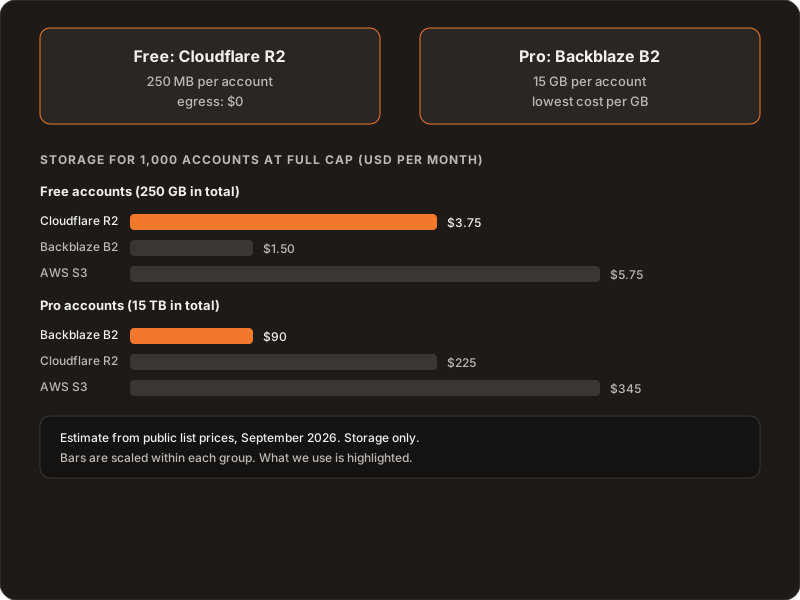
Two readings. The first is that most of the cost is in Pro: storing 15 TB costs about $90 on B2 and almost four times that on S3. There, the cheapest provider per GB wins without a debate. The second is the uncomfortable part: on paper, putting Free on B2 as well would be cheaper, about $1.50 against $3.75. The difference of keeping Free on R2 is about two dollars a month per 1,000 accounts.
So why two?
Because paying a couple of dollars buys things a dollars-per-GB spreadsheet does not see:
- Different traffic. Free accounts are the ones that still read from the origin now and then, for example when a screen misses a file in its cache. On R2 that costs $0, so there is nothing to watch.
- Blast radius. Abuse, or a spike of free accounts, stays with its own provider and does not inflate the bill of the customers who pay.
- A clear edge when upgrading. Moving to Pro is a concrete event: files move from one provider to the other with a defined job (the other article covers it), and downgrading moves nothing.
- Room for later. If heavy playback ever needs traffic with no egress cost, R2 is already there, with no need to redo the free tier.
What the decision costs us
Two sets of credentials and two configured disks, a move job to maintain, and CORS rules on two buckets (why they need them too). And a rule we set from the start: never fall back to another provider silently. If a disk fails, the API fails with a clear error, because we would rather find out at deploy time than months later with a customer’s files in the wrong place.
What we ruled out
- Everything on S3. The usual choice, but with the highest price per GB on the list and paid egress.
- Everything on B2. Cheaper on paper by two dollars, but with no isolation between Free and Pro and no guaranteed free egress for the traffic we worry about most.
- Azure Blob by default. With no S3 API, it would be a separate integration with no reason behind it.
What we would revisit
This is a list-price model, not an invoice, and a decision like this has to be reviewed with real data: if the operational cost of running two providers ever outweighs the isolation we bought, we go back to the spreadsheet. Once we have real usage data per plan, that is the first thing we will look at.
Further reading
How the decision works inside: storage by plan. How we ship the apps to the stores: automated releases. The map of all the guides: Building ChronoFlow. If you are choosing where to keep your product’s files: Services.