
Automating iOS and Android releases: what we gained over doing it by hand
ChronoFlow is a single Flutter app that reaches Android, Android TV and iOS. Every version has to be built, signed, numbered and uploaded to its store. This article covers how we automated that with GitHub Actions, what changes compared with doing it by hand, especially on iOS, and what cannot be automated. We are on that road now: we use it for our test builds and for the first submission to the stores.
What doing it by hand looks like
On Android you build the bundle, sign it with your upload key, bump the version number by eye and upload it in the Play Console. On iOS you also need a Mac with Xcode: the distribution certificate and the provisioning profile have to be in the right keychain, you archive the app, upload it and keep track of build numbers in your head.
It works, but it has a hidden cost: the Mac becomes the release process. It holds the keys, it has the right Flutter version, and only one person knows the steps. If that machine breaks, or that person is away, there is no release.
What we automated
Each platform has two GitHub Actions workflows, and both are launched by hand with a button, not on every change:
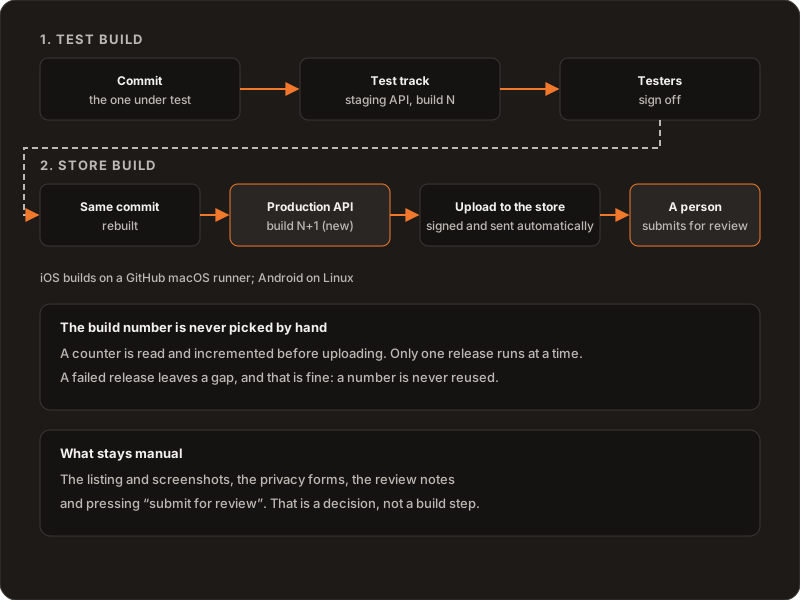
- Test build. It builds the commit you want to test with the staging API and uploads it to the test track: TestFlight on iOS and internal testing on Play.
- Store build. When testers approve, it takes the same commit, rebuilds it with the production configuration and a new build number, and uploads it to the store. It leaves a git tag and a GitHub release with the binary attached.
Tests and analysis are not repeated in the release: they already ran in the pull request that brought the change to the main branch. The release only builds, signs and uploads.
The iOS case: no Mac in the way
The heaviest thing about iOS is that building and signing require macOS. Our workflows run on a macOS runner that GitHub provides, so on release day there is no Mac of ours in the way: it builds, signs and uploads from the cloud. The signing material lives encrypted in the repository’s secrets, is written into the job and is deleted when it finishes.
One honest caveat. Creating the distribution certificate for the first time is the step that traditionally calls for Keychain Access on a Mac. It is done once; after that, nothing that repeats with every version needs it. There is also a cost: macOS minutes on GitHub cost more than Linux minutes. That is why the analysis and tests of every pull request run on Linux and only the iOS release uses macOS.
What we learned
- The store build is not the test build. One built against the staging API can never be the one that ships. Instead of a rule someone has to remember, the workflow makes it impossible: the store build starts from the commit you give it, the one that passed testing, but always rebuilds with production and a new number.
- Build numbers are sacred. Stores require them to grow and do not accept reusing one. We keep them in one place, separate per platform. Each release reads the counter and increments it before uploading, and only one release runs at a time. A failed release leaves a gap, and that is fine.
- Automate the build, not the decision. Submitting for review stays manual on purpose. It is safer and makes clear who said “go”.
- Everything leaves a trail. Each release has its tag, its binary and its run log. If someone asks what exactly is in the store, the answer is in the repository.
A practical detail: the token GitHub gives each run cannot modify repository variables, so to update the counter we use a personal token with a single permission. And on iOS, the app record in App Store Connect has to exist before you upload the first build.
What stays manual
The store listing and its screenshots, the privacy forms, the answers to the review and the submit button. None of that is a build task, and we do not want it to be. What we did was put it in order: we cover it in a checklist for submitting your first app to the stores.
What we ruled out
- Releasing from a personal Mac. It makes one person and one machine a single point of failure.
- Submitting for review automatically. For now, the last decision stays human.
- Reusing the test binary. It has the wrong configuration and there is no safe way to change it afterwards.
Further reading
Why one app is both console and screen: Controller and Player in one app. Where files live and why: two storage providers. The map of the guides: Building ChronoFlow. If you need to take your app to the stores: Services.